
Step 1: Generate Test Scripts from Your Existing Sources
Performance testing has always started with a blank script. A ticket gets written. An engineer reads it. Then someone manually translates that intent into HTTP calls, load profiles, and assertions — a process that takes hours and drifts out of date the moment the story is updated. Cavisson’s Generate With AI feature eliminates that translation step entirely. It connects directly to the four places where your team’s requirements already live: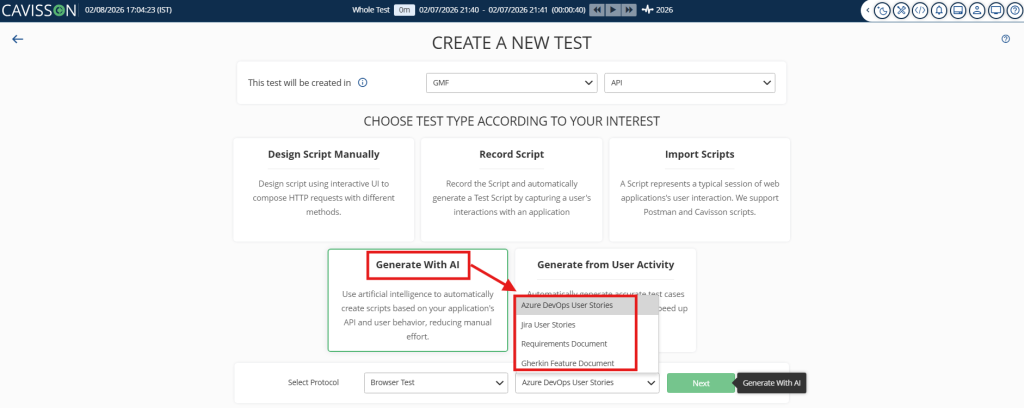
JIRA
Azure DevOps
PRD / BRD
Gherkin / BDD
Once connected, the AI reads each source and extracts exactly what a performance test needs: the transaction to test, the SLA to assert, the load to simulate, and the user behaviour to model. A JIRA story that says “search must return results in under 2 seconds for 1,000 users” becomes a fully parameterised load test — complete with ramp-up profile, threshold assertions, and realistic think times — without anyone opening a script editor.
For teams using Gherkin / BDD, the integration goes even further. Cavisson reads Given/When/Then feature files and converts functional scenarios directly into performance scripts. When the feature file changes, the performance test regenerates automatically. Your functional and performance intent stay in sync, always.
For PRD and BRD documents, Cavisson scans uploaded documents for non-functional requirement language — phrases like “shall respond within,” “must support X concurrent users,” or “error rate not to exceed” — and converts each statement into a testable scenario with a hard SLA assertion.
WHAT GETS GENERATED
Each generated test includes: the primary transaction(s), load profile and VU ramp-up, SLA threshold assertions, user persona and think times, and parameterised test data sampled from your environment. It is ready to execute — not a skeleton that still needs manual work.
Step 2: Automated Execution via Azure DevOps Pipelines
A test that lives in a dashboard and gets run manually is still a manual process. Cavisson integrates with Azure DevOps Pipelines to make performance testing a first-class citizen of your CI/CD workflow — triggered automatically, not scheduled by an engineer.
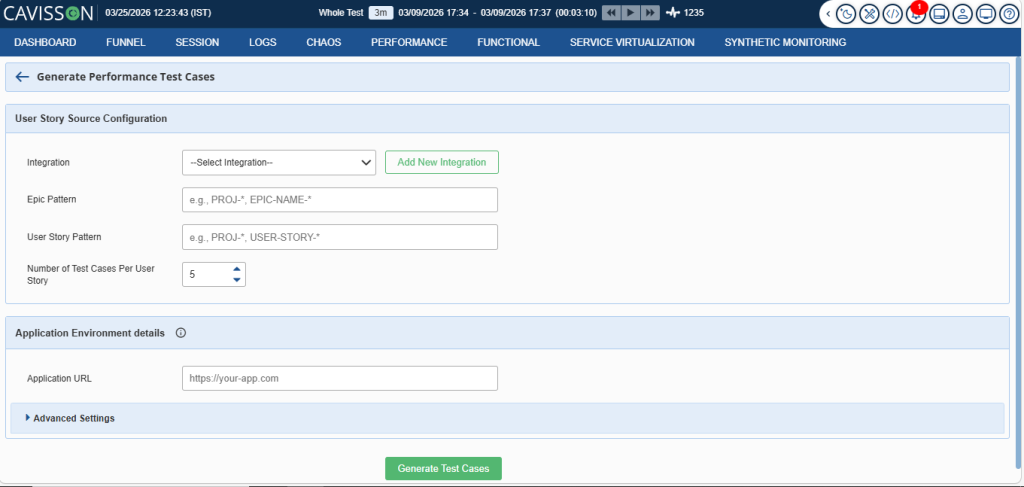
Once connected, Cavisson injects a performance stage into your pipeline YAML. Every pull request that touches a feature covered by a generated test automatically triggers that test before merge. No human needs to remember to run it. No performance check gets skipped because a sprint was busy.
azure-pipelines.yml (Cavisson stage — auto-injected) – stage: CavissonPerformance dependsOn: IntegrationTest jobs: – job: AITestExecution steps: – task: CavissonNetStorm@2 inputs: source: jira # or azure | prd | gherkin slaGateEnabled: true failOnSLABreach: true autoCreateTickets: true # feeds Step 3 |
The SLA gate is the critical control point. If the test run breaches any threshold extracted from the original acceptance criteria — response time, error rate, throughput — the pipeline stage fails. The build does not merge. The regression is caught before it reaches production, with full context about which requirement was violated.
NO SEPARATE TOOL, NO SEPARATE DASHBOARD
Execution results surface directly in the Azure DevOps pipeline view — the same place developers already review build status and test results. Performance health is visible in context, not buried in a separate monitoring tool that only the performance team checks.
Step 3: Failures Auto-Created as JIRA Tickets & ADO Work Items
This is where Cavisson closes the loop. When a test execution uncovers a failure — an SLA breach, an error rate spike, or an anomaly flagged during the run — Cavisson automatically creates a defect ticket in JIRA or a Work Item in Azure DevOps. No engineer needs to manually copy results into a ticket. No finding gets lost in a test report that no one reads.
Each auto-created ticket includes everything the development team needs to act on it:
- The test scenario that failed and the specific SLA threshold that was breached
- Response time percentiles, error rates, and throughput figures from the run
- A direct link back to the originating user story, PRD requirement, or Gherkin scenario
- The pipeline run ID and commit SHA so the regression can be pinpointed exactly
- Suggested priority based on the severity of the breach relative to the SLA.
The ticket lands in the same sprint board where the story that caused it lives. The developer who wrote the code sees the performance defect alongside their functional test results — in the tool they already use, with the context they need to fix it immediately.
The test was written from the ticket. The failure goes back to the ticket. The entire workflow lives inside the tools your team already uses every day.
JIRA WORKFLOW INTEGRATION Cavisson writes test status back to JIRA as a custom field (Performance Gate). Stories that fail their SLA gate in CI are automatically flagged in the sprint board. Your product owner and scrum master see performance health alongside functional test results — no separate report, no additional handoff, no meeting to review a PDF. |
Why This Approach Changes Everything
Zero scripting overhead
Tests are generated from sources your team already maintains. No dedicated performance scripting effort per sprint.
Always in sync
When requirements change, tests regenerate. When tests fail, tickets are created. The loop is self-maintaining.

Shift-left, for real
Performance checks run on every PR, not once before release. Regressions are caught in hours, not found in production.
Full traceability
Every test links back to a requirement. Every failure links back to a test. Every ticket links back to a story. End-to-end accountability.
No tool sprawl
Your team stays in JIRA and Azure DevOps. Cavisson surfaces everything — generation, execution, defects — inside the tools already in use.

Faster release cycles
Automated gating removes the manual performance review bottleneck that delays releases. Ship with confidence, not with fingers crossed.
WORKFLOW SUMMARY
The Cavisson Intelligent Testing Loop
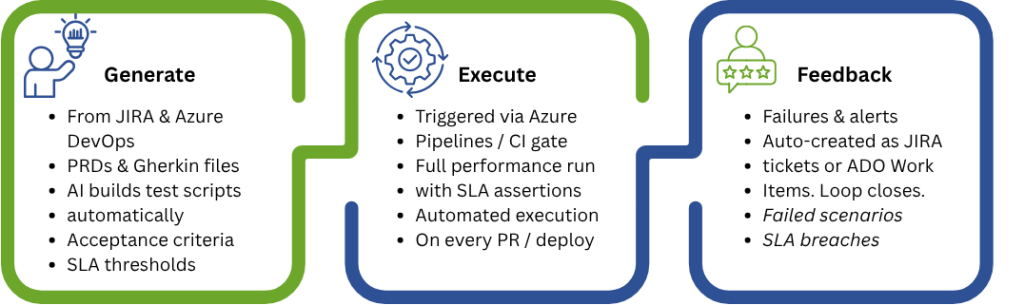
Requirements in. Tests out. Issues back. Automatically.
Conclusion
The traditional model of performance testing — manual scripting, scheduled runs, and PDF reports reviewed in a meeting — belongs to a different era. It creates friction, introduces lag, and breaks the moment requirements change.
Cavisson’s intelligent testing loop reframes performance testing not as a phase, but as a continuous, automated signal embedded in your existing workflow. Requirements flow in from JIRA, Azure DevOps, PRDs, and Gherkin files. Tests generate and regenerate automatically. Every pull request is gated against the SLAs your team already defined. Every failure lands as an actionable ticket, linked to the story that caused it, in the tool the developer already has open.
The result is not just faster testing — it is a fundamentally more accountable development process. Teams ship with confidence rather than assumption, catch regressions in hours rather than in production, and maintain a living, traceable record from acceptance criteria through to test execution and defect resolution.
For teams on JIRA, Azure DevOps, or with existing PRDs and Gherkin suites, Cavisson offers a guided proof-of-concept. Connect your project, provide five inputs from any source type, and see generated tests in your dashboard within the same session. Visit cavisson.com or contact your account team to get started.